>

Criminal History Background Clearance

Criminal History Background Clearance

Please note: Faculty and Staff are handled by Human Resources and should not use the process below. This website is for students and visitors only.

Purpose

Peabody College takes seriously the safety and security of minors and vulnerable populations who reside, study, and are served in various ways on our campus daily. As such, any faculty, staff, or student who, through classes, labs, or other work settings (e.g., interns and observers), comes into direct contact with minors and/or vulnerable populations are required to undergo a fingerprint criminal background check. This check is in accordance with Tennessee law.


Background Clearance Process Overview

The background clearance process involves four steps that you must complete in an Oracle Learn course titled Peabody Background Clearance Process.

There are two different offerings (sections) of this course: Fingerprint and Recheck. Please only enroll in one course, and make sure that you are enrolled in the correct offering!

*Please note that there is a temporary glitch in the system and the enrollment tab may say “Join Waitlist”. Please choose that and you will be enrolled in the course. There is no waitlist.

Background checks are valid for four years. If your Peabody clearance has expired, please use the Recheck link above to update your clearance. Note that all rechecks are done online. There is no need to re-fingerprint.

Your program of study determines if a background check is required. Click here to view program requirements.

If you have had a fingerprint background check within the last four years we may be able to accept that clearance.

If your program of study requires a fingerprint check, the previous check must have also been fingerprint. For the previous check to be considered, please send either a copy of the clearance report, or a verification letter from the entity that required your screening to bco@vanderbilt.edu for consideration. The letter, on letterhead, should include your name, the date and type of check (e.g. fingerprint, criminal background, etc.), and that there were no findings. If accepted, you may still be required to recheck during your program of study, depending on the expiration date of the previous check.

Background checks done for TSA or Visa status cannot be accepted.

Even if we can accept your previous clearance, you must complete steps 1-3 in the Oracle Learn course.

Please contact bco@vanderbilt.edu with any questions.

Note: you may be pre-enrolled in the course. This will show in the "my learning" section of your account when you log in. If you are not pre-enrolled you can self-enroll.

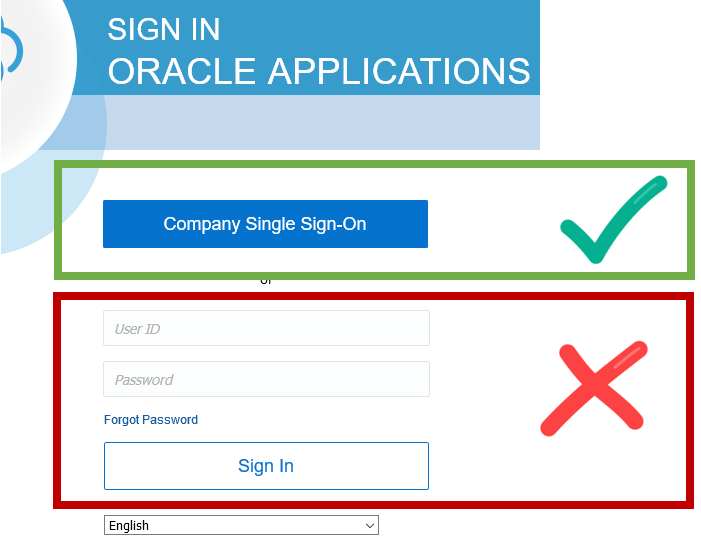
Log In

Log into Oracle Learn using the Company Single Source sign in and your VUNet ID and password.
 

Fingerprinting Steps

Fingerprint background checks are conducted by IdentoGO. You will register and pay IdentoGO directly. There are three options depending on your location and available identity documents. Review the options below and follow the instructions for the one that fits your situation.

OptionMethodBest for
Option 1Digital scan at an IdentoGO site in TennesseeStudents in the Nashville area with a SSN and government-issued ID
Option 2Digital scan at an IdentoGO site outside TennesseeStudents located outside Tennessee who have required identity documents
Option 3Ink fingerprint cards made on campus, then mailedStudents without required ID for scanning, or without transportation to an off-campus site

Digital Scanning (Options 1 & 2)

  • Quicker results
  • No risk of card rejection
  • Requires U.S. Social Security Number and government-issued ID
  • Some states do not allow out-of-state fingerprinting
  • Sites are not on campus — transportation required

Ink Fingerprint Cards (Option 3)

  • Suitable for those without a U.S. Social Security Number
  • VUPD is on campus — no transportation needed
  • Longer processing time
  • Slight chance of rejection requiring re-submission

Specific Fingerprinting Instructions

  • Scanning in Tennessee

    Use this option if you will be fingerprinted at an IdentoGO location within Tennessee.

    Before You Begin

    Steps

    1. Go to the IdentoGO Tennessee portal: tn.ibtfingerprint.com

    2. Scroll down and select Schedule a New Appointment.

    3. Enter Service Code: 28TY72. The next screen should display Vanderbilt University – Peabody College. Select Continue.

    4. Enter ORI Number: TNCC19116. The next screen should confirm the agency name. If it does not, go back and re-enter the ORI number. Select Yes.

    5. Read and accept the acknowledgment, then enter your zip code, choose an IdentoGO location, and complete your appointment scheduling.

      Important: Only State Agency Enrollment Centers provide the service required for this background check. Do not select a TSA PreCheck Center. Locations inside a UPS store or retail establishment are generally not acceptable.
    6. Print or email yourself the appointment confirmation.

    7. Attend your appointment.

      • You will pay for your background check at your appointment.
      • You must present a government-issued ID. A Vanderbilt ID is not acceptable.
      • If you do not have a Social Security Number, use 979-55-5555 when prompted.
  • Scanning Outside Tennessee

    Use this option if you will be fingerprinted at an IdentoGO location outside of Tennessee.

    Note: Many states do not permit out-of-state fingerprinting. If the Service Code only returns Tennessee locations when you search, your state is not enrolled. In that case:

    • If you will have transportation after arriving in Nashville, schedule a Tennessee appointment for shortly after you arrive. Screening sites are not located on or near campus.
    • If you will not have transportation, use Option 3 to have ink cards made on campus at VUPD, then bring the cards and your signed IdentoGO barcode form to 215 Peabody Administration Building and BCO will mail them for you.

    Before You Begin

    Steps

    1. Go to the IdentoGO locations page: identogo.com/locations

    2. Select a location in your state. Choose Out of State fingerprinting if that option is listed, or schedule a standard appointment.

      Important: Only State Agency Enrollment Centers provide the needed service. Do not select a TSA PreCheck Center or a location inside a UPS store or retail establishment.
    3. Enter Service Code: 28TY72. The next screen should display Vanderbilt University – Peabody College. Select Continue.

    4. Enter ORI Number: TNCC19116. The next screen should confirm the agency name. If it does not, go back and re-enter the ORI number. Select Yes.

    5. Read and accept the acknowledgment, then follow the prompts to complete your registration.

    6. Print or email yourself the appointment confirmation.

    7. Attend your appointment.

      • You will pay for your background check at your appointment.
      • You must present a government-issued ID. A Vanderbilt ID is not acceptable.
      • If you do not have a Social Security Number, use 979-55-5555 when prompted.
  • Have Ink Card Prints Made

    Use this option if you do not have the required identity documents for digital scanning, or if you do not have transportation to an off-campus IdentoGO site.

    Before You Begin

    Register with IdentoGO

    1. Go to the IdentoGO Tennessee portal: tn.ibtfingerprint.com

    2. Scroll down and select Register for Fingerprint Card Processing Service. On the next screen, choose Yes.

    3. Enter Service Code: 28TY72. The next screen should display Vanderbilt University – Peabody College. Select Continue.

    4. Enter ORI Number: TNCC19116. The next screen should confirm the agency name. If it does not, go back and re-enter the ORI number. Select Yes.

    5. Read and accept the acknowledgment and follow the prompts to complete your information.

    6. Click the blue Pay button (located slightly below the barcode) and complete payment.

    7. Print the Barcode page — the barcode is in the upper-right corner. Keep a printed or PDF copy; you will need it for mailing.

    Print or email yourself the payment confirmation.

    Have Your Ink Fingerprint Cards Made

    You will need two (2) ink fingerprint cards. Options for getting them made include:

    • Some police stations offer this service.
    • Some UPS store locations offer this service — search online for a location near you.
    • Vanderbilt University Police Department (VUPD) provides fingerprint cards by appointment. Click here to schedule an appointment.
    The card should include sections 1–17 completed by you. The person fingerprinting you must complete sections A–B (highlighted in blue).

    Mail Your Fingerprint Cards

    1. Mail one (1) ink card and one barcode form using a trackable shipping method to:

      Mailing Address
      Prints, Inc.
      IdentoGO TN Card Scan Operations
      100 Salem Ct.
      Tallahassee, FL 32301
      In the lower-left corner of the envelope, include your UE ID number and RegID number — both are found on the barcode form.
    2. Keep the second ink card and second barcode form in case re-submission is required.

Contact Us

Office: 215 Peabody Administration Building
Email: bco@vanderbilt.edu
Phone: 615-322-8270

Frequently Asked Questions

  • Who needs a background check?

    Background checks are required for any faculty, staff, or student who, through classes, labs, or other work settings, comes into direct contact with minors and/or vulnerable populations. As well, non-Peabody students enrolled in classes that directly interact with children and/or vulnerable populations are required to obtain a fingerprint background check. 

  • I am participating individually in an internship, volunteer opportunity, or other activity and they have asked for a background check. Can I go through this process?

    This process is designed for Peabody students participating in university-approved academic and co-curricular activities and cannot be used for events or programs not affiliated with Vanderbilt. 

  • How will I know if my background check is completed?

    When the clearance process is complete the date of clearance will be entered into your Oracle Learn course and, if you have completed steps 1-3, the course will be marked as completed. You can contact the Background Clearance Office (bco@vanderbilt.edu) to check on your clearance at any time.

  • Who completes the background check?

    While the Background Clearance Office facilitates the background check program for students, the checks are conducted by either Identogo or outside vendors.

  • How long does a background check take?

    Because the background check is completed by an outside vender, the time to process results may vary for each individual and Vanderbilt University has no control over the timeline for receiving results. We encourage students going through the process to monitor their Vanderbilt email address for messages from bco@Vanderbilt.edu and respond to all communications as soon as possible.

  • Who sees the results of my background check?

    The Background Clearance officer, Human Resources, and relevant University personnel will have access to the detailed results of background checks completed through the University's process. General information about background checks may be shared with outside parties if a student gives the University permission to disclose information.

  • What happens if something is flagged in my background check?

    If a student's background check reveals an incident, the Background Clearance officer will review the available information and will determine next steps. Depending on the nature and severity of the flag, next steps may include meeting with the student to gather more information and/or escalation to the Background Clearance Committee for review.

  • Will anyone outside of the University be given my background check results?

    If the student needs information disclosed to an outside party, the student can submit a Background Check verification letter form which gives the University permission to disclose information to an outside party. The information disclosed will typically include that a background check was completed, when the check was completed, and if the check met the standards of the University.

  • How often do I need to complete a background check?

    Background checks on file with the University are valid for four years. To determine if you currently have a background check on file, visit http://admin.app.vanderbilt.edu/pomcc or contact bco@Vanderbilt.edu

  • Who do I contact if my question is not answered here?

    For additional information, contact bco@Vanderbilt.edu.